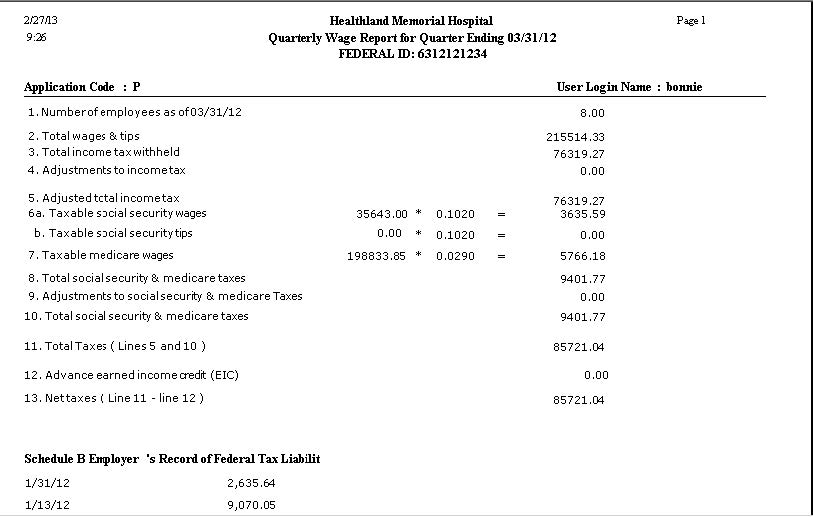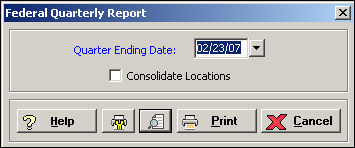
The Federal Quarterly Report window is used to generate a report that shows employee federal taxes for a specific quarter. The Federal Quarterly Report has the information needed to file the 941 information with the federal government.
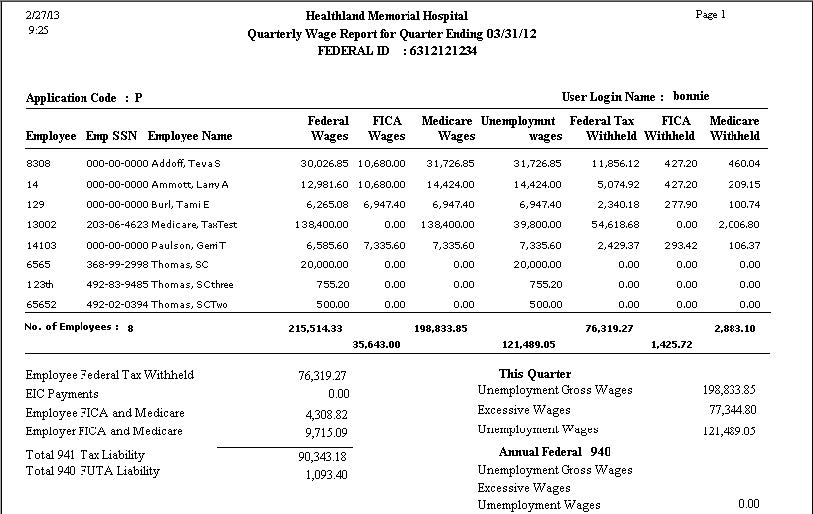
This report prints each employee who had earnings during the quarter with their employee number, social security number, name, federal, FICA and Medicare taxable wages, federal unemployment wages, and federal, FICA and Medicare withholdings. A second report shows total amounts that need to be reported for the 941.
To access the Federal Quarterly Report window, go to Payroll > Admin > End of Quarter > Federal Quarterly Report. [+]
In the Quarter Ending Date field, use the drop-down calendar to select the quarter ending date for the report.
Check the Consolidate Locations box to consolidate and show taxes for all locations.
Click the Preview button (located to the left of the Print button) to view the Quarterly Wage Report in the Report Viewer, or click Print to print the report to the designated printer. See Reporting/Printing Functions for detailed information on using the Printer Settings and Print Preview buttons.
Click Cancel to close the window.
Federal Quarterly - Employee Detail Report Example
Federal Quarterly - 941 Amounts Report Example